You may be aware of the fact that Windows functions that return current time with millisecond precision are not accurate to a millisecond. Then, again, you may be not. In any case, I'll show you how to calculate accurate time. Well, maybe not really accurate, but at least it will be miles better than Windows' functions. Let's start with the system time. If you take a look at the GetSystemTime function, you'll see that it returns a structure containing years, months, hours ... and so on down to milliseconds. The problem is that it is not incremented in millisecond steps. If you fetch the time, wait for two milliseconds and fetch the time again, chances are that both structures would be completely the same. Raymond Chen states in Precision is not the same as accuracy that the accuracy of typical Windows clock is somewhere from 10 to 55 ms. On most computers I've tested, system time accuracy is approximately 15 ms. To demonstrate this, I've written this 'complicated' code fragment: procedure TForm6.btnGetSystemTimeClick(Sender: TObject);
var
i: integer;
st: TSystemTime;
begin
for i := 1 to 15 do begin
Windows.GetSystemTime(st);
outLog.Lines.Add(IntToStr(st.wMilliseconds));
Sleep(1);
end;
end;
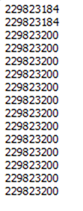
 The code merely retrieves system time, logs it into TMemo and sleeps for approximately one millisecond. The result (picture on the right) is a little 'jumpy' - most of the time milliseconds stay still and then they are increased by approximately 15 milliseconds. The code merely retrieves system time, logs it into TMemo and sleeps for approximately one millisecond. The result (picture on the right) is a little 'jumpy' - most of the time milliseconds stay still and then they are increased by approximately 15 milliseconds.
 Careful reader would notice that the clock was read less than 16 times between the first '723' result and the first '739' result. That's because Sleep doesn't guarantee that the execution will resume in exactly the specified time. Careful reader would notice that the clock was read less than 16 times between the first '723' result and the first '739' result. That's because Sleep doesn't guarantee that the execution will resume in exactly the specified time.
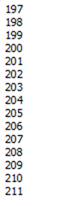
Similar results (on the left) can be achieved by using GetTickCount instead of GetSystemTime.
If you still think that this doesn't concern you because you're only using Delphi's Now and similar functions, then you're wrong. Delphi calculates Now using GetLocalTime, which exhibits exactly the same symptoms as GetSystemTime.
Can we do better?
Of course we can! Otherwise this blog entry would not exist :)
There is a QueryPerformanceCounter function which returns current value of some Windows' internal counter. Exact interpretation of this value is hardware dependent so you have to use QueryPerformanceFrequency function to determine the speed with which the performace counter is incremented. The accuracy of the performace counter is also hardware-dependant but usually it is much higher than one millisecond.
So here's the plan. We'll take a snapshot of system time and performance counter. When we need an accurate time, we'll query the performance counter and use stored system time, stored performance counter and current performance counter to calculate current system time. The main magic is done in two lines immediately after 'else begin'. The rest of the code just converts milliseconds into the TSystemTime record.
function PerformanceCounterToMS(perfCounter: int64): int64;
begin
if GPerformanceFreq = 0 then
Result := 0
else
Result := Round(perfCounter / GPerformanceFreq * 1000);
end;
procedure GetSystemTime_Acc(var systemTime: TSystemTime);
var
pcDiff : int64;
perfCount: int64;
sum : cardinal;
begin
if GPerformanceFreq = 0 then
Windows.GetSystemTime(systemTime)
else begin
QueryPerformanceCounter(perfCount);
pcDiff := PerformanceCounterToMS(perfCount - GPerfCounterBase);
sum := cardinal(GSystemTimeBase.wMilliseconds) + (pcDiff mod 1000);
systemTime.wMilliseconds := sum mod 1000;
pcDiff := pcDiff div 1000;
sum := cardinal(GSystemTimeBase.wSecond) + (pcDiff mod 60) + (sum div 1000);
systemTime.wSecond := sum mod 60;
pcDiff := pcDiff div 60;
sum := cardinal(GSystemTimeBase.wMinute) + (pcDiff mod 60) + (sum div 60);
systemTime.wMinute := sum mod 60;
pcDiff := pcDiff div 60;
sum := cardinal(GSystemTimeBase.wHour) + (pcDiff mod 24) + (sum div 60);
systemTime.wHour := sum mod 24;
pcDiff := pcDiff div 24;
DecodeDateFully(GDateBase + pcDiff, systemTime.wYear, systemTime.wMonth,
systemTime.wDay, systemTime.wDayOfWeek);
end;
end;
Similar but even simpler code deals with GetTickCount. There is also a 64-bit version of GetTickCount, which doesn't have its problems (wrapping around every 49 days or so).
function GetTickCount64_Acc: int64;
var
perfCount: int64;
begin
if GPerformanceFreq = 0 then
Result := Windows.GetTickCount
else begin
QueryPerformanceCounter(perfCount);
Result := GTickCountBase + PerformanceCounterToMS(perfCount - GPerfCounterBase);
end;
end;
function GetTickCount_Acc: DWORD;
begin
Result := GetTickCount64_Acc AND $FFFFFFFF;
end;
The only remaining piece of mistery is the initialization code. We have to take a snapshot of system time immediately after it is incremented (to get the most accurate value) and a snapshot of performance counter. We also try to make sure that context switch did not occur between those two measurements.
procedure InitExactTimeBase;
var
perfCount1: int64;
perfCount2: int64;
st1 : TSystemTime;
st2 : TSystemTime;
begin
if GPerformanceFreq = 0 then
Exit;
SetThreadPriority(GetCurrentThread, THREAD_PRIORITY_HIGHEST);
Sleep(0);
Windows.GetSystemTime(st2);
repeat
st1 := st2;
QueryPerformanceCounter(perfCount1);
Windows.GetSystemTime(st2);
GTickCountBase := Windows.GetTickCount;
QueryPerformanceCounter(perfCount2);
until (st1.wMilliseconds <> st2.wMilliseconds) and
(Round(perfCount1 / GPerformanceFreq * 10000) = Round(perfCount2 / GPerformanceFreq * 10000));
SetThreadPriority(GetCurrentThread, THREAD_PRIORITY_NORMAL);
GPerfCounterBase := perfCount2;
GSystemTimeBase := st2;
GDateBase := EncodeDate(st2.wYear, st2.wMonth, st2.wDay);
end;
Pitfalls
This code is useful when you want to measure lenght of some operation in the range of few milliseconds. You would not, however, want to use it as a replacement of standard functions when you just need a real-time clock. There is, for example, no resynchronisation - if user or some time-adjusting program changes the system clock, my 'accurate' code will not notice this. On the other hand, this can be useful when performing interval measurements.
You should also keep in mind that performance counter is not necessary problem-free. For example, Microsoft's knowledge base entry #274323 describes performance counter problems on some (admittedly buggy) hardware platforms.
The Code
GpTime web pages are not up yet so for the time being the only access to the source is here. There is also a small test program available.
Things go better with ... Vista
I was totally surprised when I tested my unit on Vista and found out that both GetSystemTime and GetLocalTime work with a millisecond accuracy! GetTickCount, however, doesn't and is incremented in old 10-55 ms (depending on the platform) intervals.
As the Now function is calculated using GetLocalTime, it also has 1 ms accuracy on Vista.
The proof is below. From left to right: GetSystemTime, GetTickCount, GetLocalTime, Now.
2009 Update
Later I found all those hacks much too much unstable for my likings. Now I’m using this trivial approach:
unit GpTime;
interface
function Now64: int64;
implementation
uses
Windows,
SysUtils,
MMSystem,
SyncObjs,
GpStuff;
var
GNowLock : TCriticalSection;
GNowHigh32 : cardinal;
GNowLastLow32: cardinal;
function Now64: int64;
begin
GNowLock.Acquire;
try
Int64Rec(Result).Lo := timeGetTime;
if Int64Rec(Result).Lo < GNowLastLow32 then
Inc(GNowHigh32);
GNowLastLow32 := Int64Rec(Result).Lo;
Int64Rec(Result).Hi := GNowHigh32;
finally GNowLock.Release; end;
end;
initialization
GNowLock := TCriticalSection.Create;
GNowHigh32 := 0;
GNowLastLow32 := 0;
timeBeginPeriod(1);
finalization
timeEndPeriod(1);
FreeAndNil(GNowLock);
end.
Labels: Delphi, open source, programming, source code, utilities, Win32 |


